Changing your plan, cancelling, and what happens after
Everything here lives in Management → Manage plan.
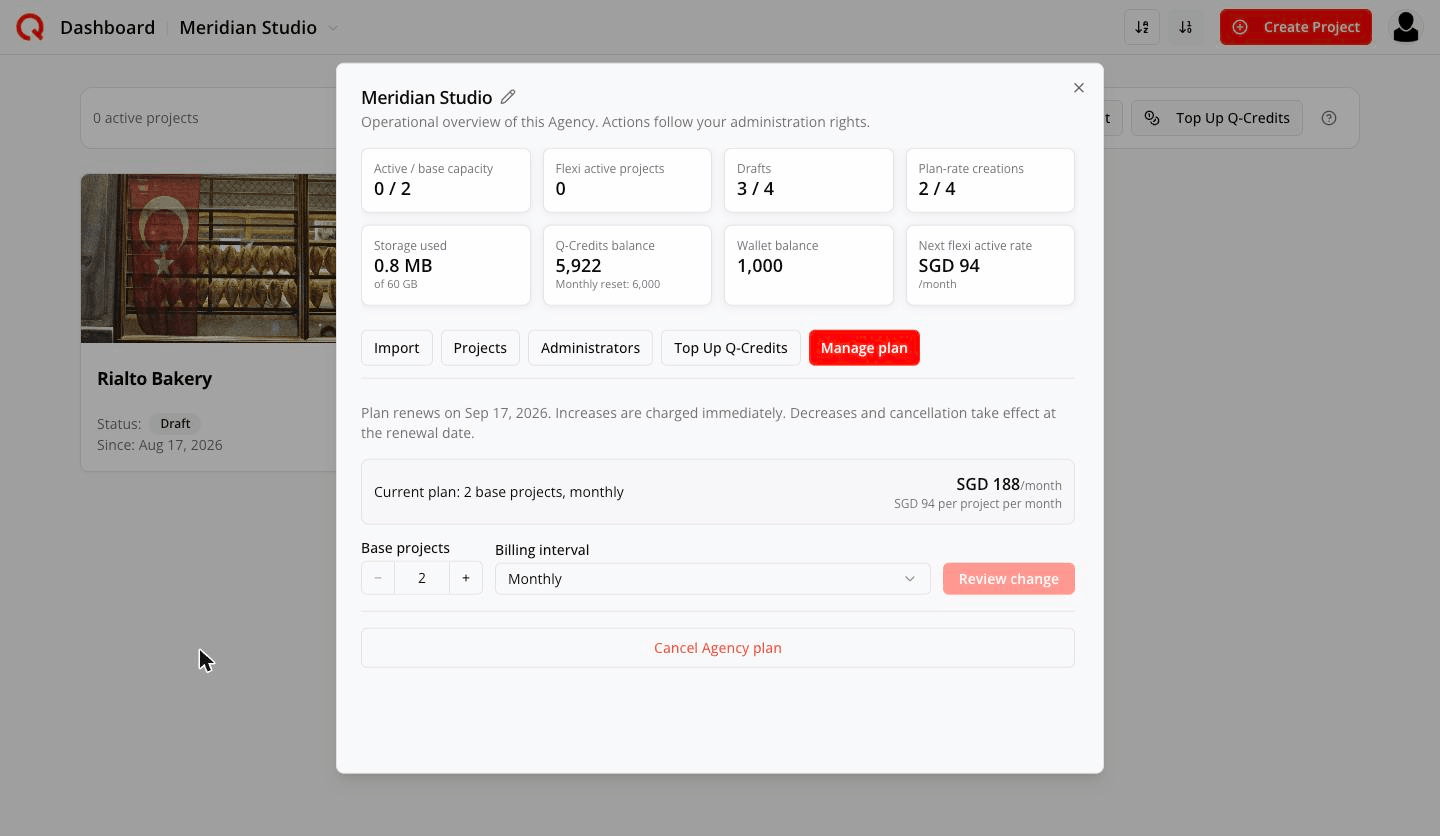
The rule at the top of the tab is the whole story:
Plan renews on Sep 12, 2026. Increases are charged immediately. Decreases and cancellation take effect at the renewal date.
Growing your plan
- Raise Base projects with the stepper.
- Click Review change.
- Read the preview —
New plan: 3 base projects, monthly — $223/month, $74.33 per project per month
This upgrade is charged immediately. Access changes after payment is confirmed.
- Confirm change (or Cancel change to back out).
You're charged only for the difference, right away, and the extra capacity is yours as soon as payment confirms.
If you were paying for flexible capacity, a base increase absorbs it: the flexible slots stop renewing, but you keep them until the boundary you already paid for, and reusing them before then costs nothing.
Switching to yearly
Change Billing interval to Yearly and review. Yearly is about 20% cheaper per project. It's an immediate paid upgrade, and your billing dates move to the new yearly anchor.
Yearly → monthly cannot be done automatically yet. There is no switch for it. To move from yearly to monthly today: cancel the yearly plan, let it run to its renewal date, and then Reactivate the workspace on a monthly plan. Reactivation is a brand-new plan at that day's prices, every project returns as a Draft, and each one needs its social accounts reconnected — so plan the switch for a quiet week.
Shrinking your plan
Lower the stepper, review, confirm. Then:
- Nothing changes today. No refund, no credit, no project switched off.
- Your current capacity stays fully usable until the renewal date.
- At renewal the smaller plan takes effect.
- If you're still running more projects than the smaller plan covers, the overflow continues as monthly flexible capacity — the preview says so:
2 active projects will continue as monthly flexible capacity.
and you tick I agree to continue monthly billing for projects above the new base.
Change your mind before the renewal date and simply set the number back.
Cancelling
Cancel Agency plan at the bottom of the tab.
Your Agency stays active until 12 Sep 2026. Flexible capacity can still be purchased and will end with the base.
- Everything keeps working until that date.
- No project is switched to draft early.
- Confirmation: Cancellation scheduled for 12 Sep 2026.
- To undo: Undo Agency plan cancellation → Cancellation removed. Your Agency will renew normally.
While a cancellation is pending you can't change the base quantity or interval — undo it first.
When the subscription ends
The workspace is not deleted. It becomes a cancelled workspace.
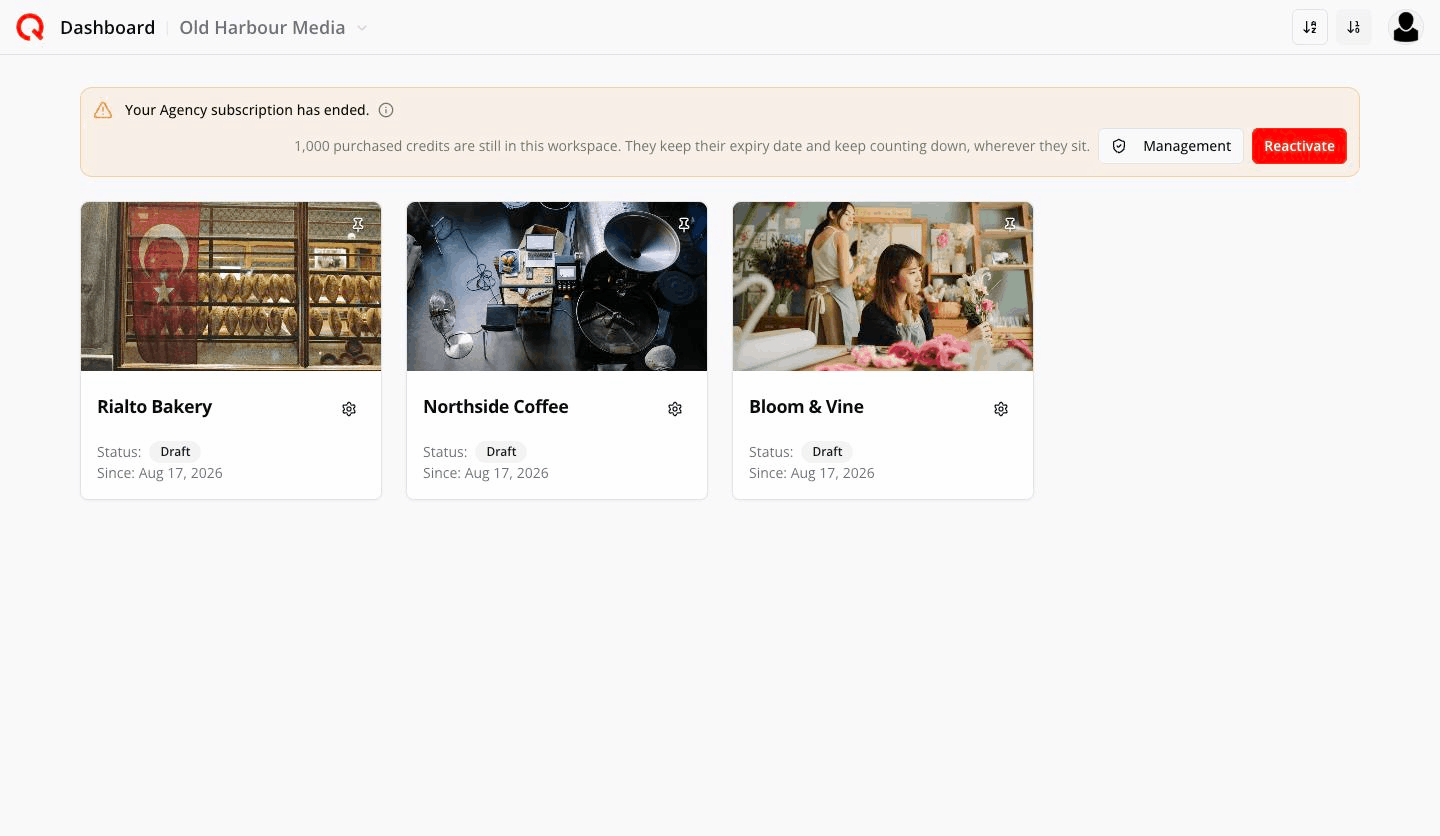
An amber banner appears — Your Agency subscription has ended. — with Management and Reactivate. The workspace name greys out in the picker, the Create Project button disappears, and every project becomes a Draft.
What the ⓘ explains:
What this means
Nothing has been deleted. Every project is still here and is now a draft — you can open, edit and work on them as usual.
Turned off while cancelled: new projects, uploads, publishing, connecting social accounts, and buying credits or add-ons.
Reactivate buys an Agency plan at today's prices. Every project stays a draft, and you activate them one by one afterwards — each one needs its social accounts reconnected.
Collaborators see the same thing, ending with Only the workspace's owner can reactivate it.
Any purchased credits stay put:
1,250 purchased credits are still in this workspace. They keep their expiry date and keep counting down, wherever they sit.
Management on a cancelled workspace
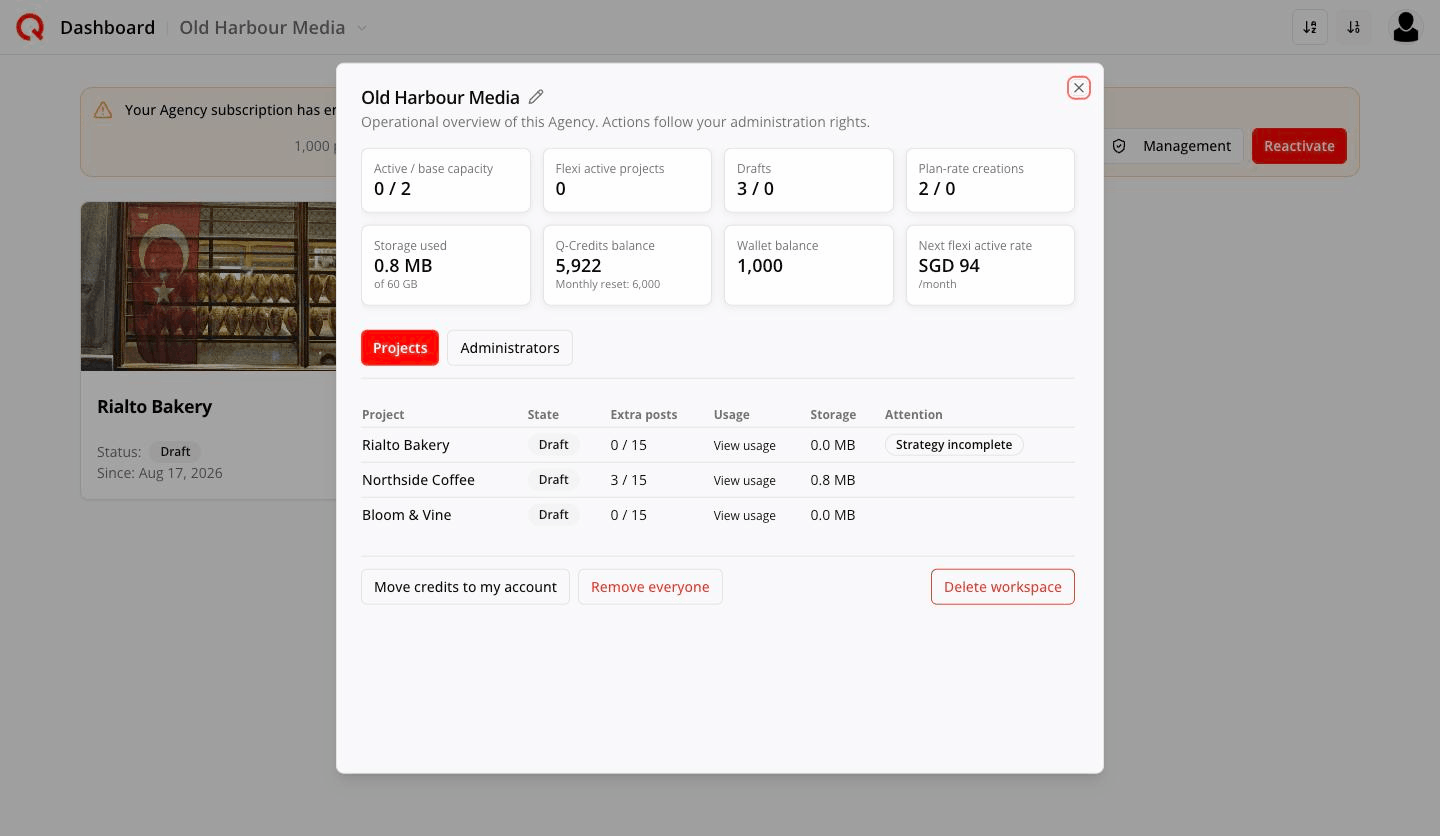
Only Projects and Administrators remain. Every tile reads zero. Three wind-down actions appear:
Remove everyone —
This removes 4 collaborator(s) across 3 project(s) and 2 administrator(s). They lose access immediately and do not come back if you reactivate — you would need to invite them again.
Move credits to my account — moves purchased credits to your personal account. One way:
This moves all 1,250 purchased credits out of this workspace and into your personal account. It is one way — if you reactivate later, the workspace starts with an empty wallet. Leaving them here is fine too, but they keep their original expiry date either way and will expire in time.
Delete workspace — two confirmations:
- The first asks you to take in what is about to go:
Delete Meridian Studio and everything in it?
This deletes all 3 project(s) in this workspace — their posts, media, strategies and settings. That includes 1 project(s) you moved in from Personal. They are deleted too; a project never leaves an Agency.
→ Continue
- The second is the point of no return:
This cannot be undone
You are about to permanently delete 3 project(s). We cannot get them back for you.
→ Delete permanently
Remaining credits are moved to your personal account before deletion.
Reactivating
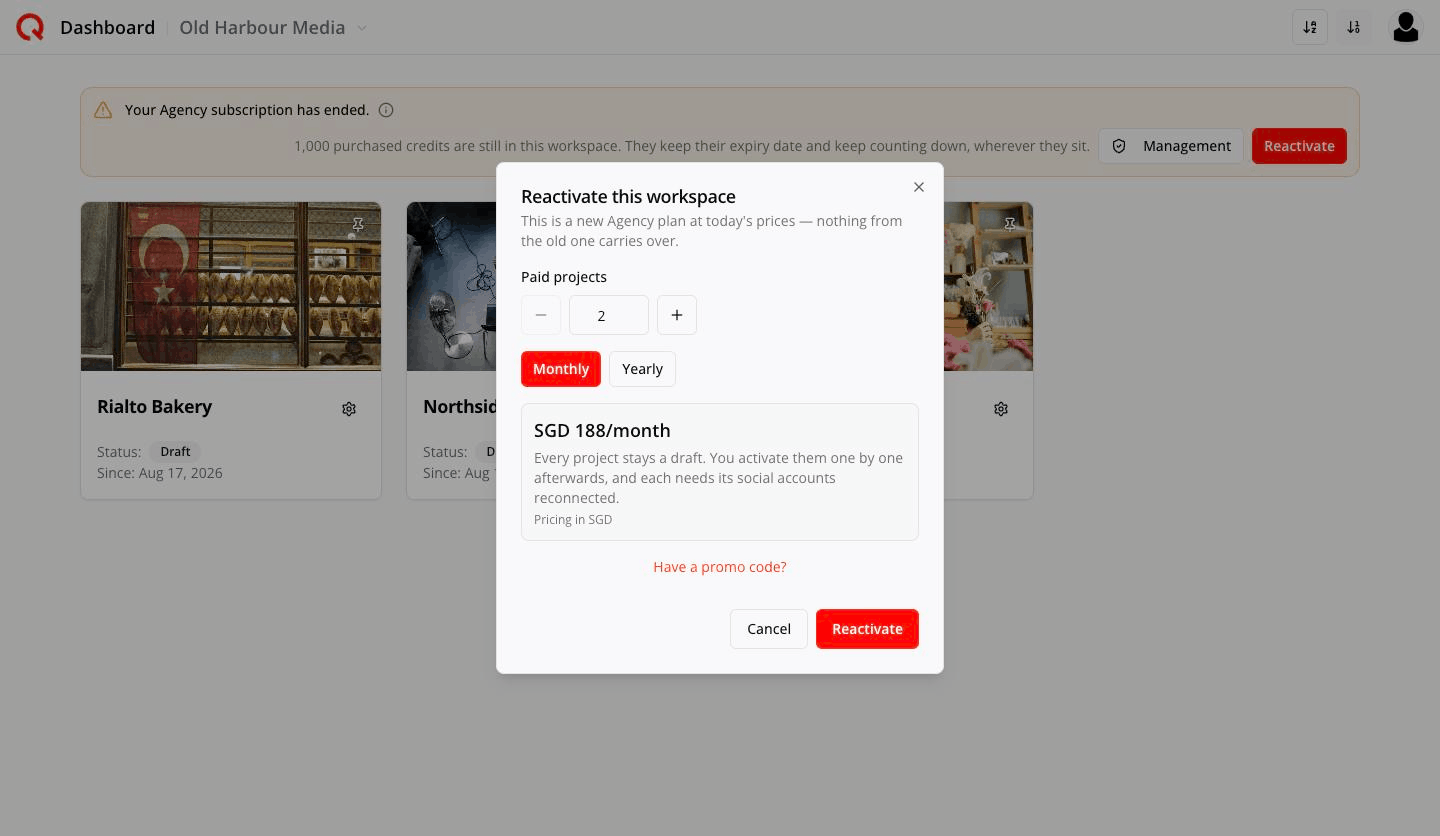
Reactivate this workspace
This is a new Agency plan at today's prices — nothing from the old one carries over.
Choose Paid projects and Monthly / Yearly, and the price appears. Then:
Every project stays a draft. You activate them one by one afterwards, and each needs its social accounts reconnected.
Owner only.
Frequently asked
Will cancelling delete my clients' work? No. Everything becomes a draft and stays there until you delete the workspace yourself.
Do I get a refund if I shrink or cancel? No. You keep the capacity you paid for until the renewal date.
Can I cancel a single project instead of the plan? Yes — deactivate it. See the project lifecycle.
My upgrade says "Payment is processing. The plan updates after confirmation.". Card approval and Quocia's records land separately. The plan updates the moment payment is confirmed — don't reload or buy again.
What if my card fails at renewal? Quocia retries. Only when Stripe finally gives up does the subscription end and the workspace go into the cancelled state above.
Can I reactivate on a different size? Yes. Reactivation is a brand-new plan at today's prices; pick whatever size you now need.