Administrators, collaborators and who can do what
Agency has two separate systems, and keeping them apart is the key to not being confused:
| Administration rights | Project roles | |
|---|---|---|
| Scope | The whole workspace | One project |
| Granted from | Management → Administrators | A project's Share Project |
| Controls | Creating, activating, billing, credits | Who can see and edit that project's content |
| Granted by | Email address | Email address |
The Administrators panel says it out loud:
Grant administration rights by email. Project roles and content access are managed separately.
Being an approver on a project does not make you an Agency administrator, and being an administrator does not give you content access to every project.
Adding an administrator
Management → Administrators → Add administrator.
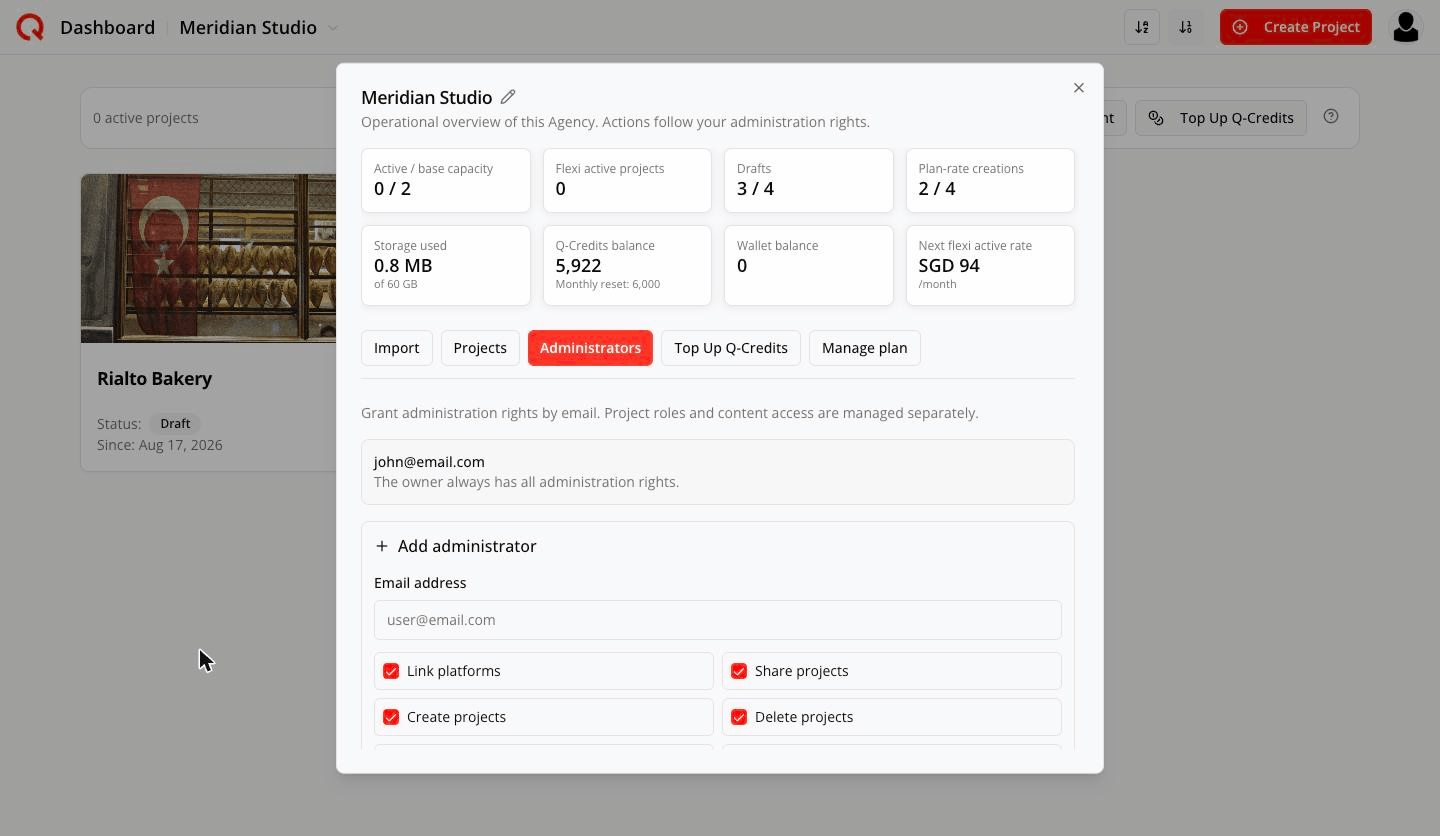
Type an email address and tick the rights you want to grant. If they don't have a Quocia account yet, they're listed as Pending registration until they sign up with that address.
The owner row always reads: The owner always has all administration rights.
The eight rights
| Right | What it lets them do |
|---|---|
| Link platforms | Connect and disconnect social accounts for an Active project |
| Share projects | Invite people to a project and set what they can do in it |
| Create projects | Create new projects in this workspace (they start as drafts) |
| Delete projects | Delete a project that is still a Draft |
| Activate projects | Make a project Active — uses a slot, or buys extra capacity if the plan is full |
| Deactivate projects | Return an Active project to Draft; frees its slot at the start of the next billing month |
| Purchase Q-Credits | Buy extra Q-Credits using the owner's saved card |
| Manage auto top-up | Set up automatic Q-Credit purchases. Charges the owner's saved card |
Every right is independent. Granting Create projects does not also grant Delete projects, and granting Activate projects does not also grant Deactivate projects. Tick exactly what you mean — someone who can create drafts but not delete them is a perfectly normal, and often sensible, configuration.
There is one exception, and it only makes things safer: Cancel deactivation — undoing a scheduled deactivation — is accepted from a holder of either lifecycle right. Whoever can activate or deactivate can call off a pending deactivation, because stopping a project from dropping out is never the risky direction.
Defaults when you add someone: the six operational rights are on, and the two money rights — Purchase Q-Credits and Manage auto top-up — are off.
Leave them off unless you mean it: both spend the owner's card.
Activate projects also spends money when the plan is full. Give it to people you trust with a commercial decision.
Who sees what
The owner — everything. Only the owner can import projects, reactivate a cancelled workspace, and delete the workspace.
An administrator — the Agency appears in their workspace picker. They see the Agency management bar if they hold at least one workspace right (Create projects, Delete projects, Activate projects, Deactivate projects, Purchase Q-Credits, Manage auto top-up), and the tabs inside Management follow the same rights — Import, Administrators and Manage plan are owner-only. Actions they don't hold rights for aren't offered. Someone holding only Link platforms or Share projects gets no bar at all: those two are exercised on one project, from that project's own card.
A project collaborator — someone shared into a single project. They see the workspace in the picker, but:
- no workspace bar, no Management, no Top Up Q-Credits
- no Create Project button
- the card reads Sharing As: Editor instead of a status
- the gear menu offers only card-image actions
They work in the project they were given, and nothing else.
How many people
Your plan includes 2 workspace users per base project (a 2-project plan → 4). That allowance governs how many people you can put on an Active project.
Drafts are capped at 3 people including the owner, whatever your plan size. Activate the project to open it up to your full allowance.
Signing in to an Agency workspace always lands you on the dashboard.
Frequently asked
Someone I added can't see a project. Administration rights aren't content access. Share the project with them from its Share Project menu.
Can an administrator spend my money? Only if you gave them Purchase Q-Credits, Manage auto top-up, or Activate projects (which buys capacity when the plan is full).
If I grant Create projects, do they get Delete projects too? No. Every right is granted and withdrawn on its own. The single exception is undoing a scheduled deactivation, which either lifecycle right can do.
I invited someone and they show as "Pending registration". They haven't registered with that email yet. The grant activates when they sign up.
Can I have more than one Agency? Yes. Each is its own workspace with its own plan, pool and people, and they all appear in the picker.
A new workspace has a red dot next to it. Someone just gave you access. It clears when you open it.
Can I remove everyone at once? Only on a workspace whose subscription has ended — the Remove everyone wind-down action. It's permanent:
This removes 4 collaborator(s) across 3 project(s) and 2 administrator(s). They lose access immediately and do not come back if you reactivate — you would need to invite them again.